Turn Any Photo into a Pumpkin Stencil
Upload a photo and get a carve-ready pumpkin pattern in seconds.
What people carve with it


How it works
Islands and bridges
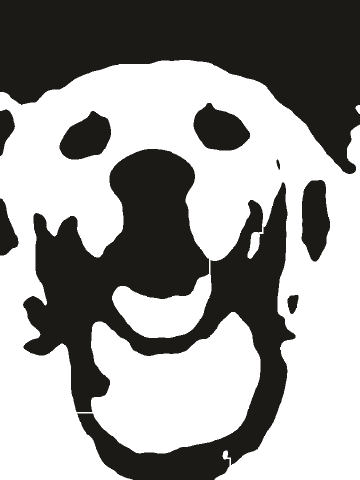
On a pumpkin, an island is a piece of skin that you cut all the way around, like the pupil of an eye or the middle of the letter O. Once it is cut free it drops into the pumpkin. A bridge is a thin strip of skin you leave in place so the piece stays attached and the shape holds. The tool marks every loose piece in red, and Fix all adds the bridges for you.
Pick a stencil width for your pumpkin
Set the PDF to a custom width so the stencil fits the flat side of the pumpkin. These sizes are a starting point, so hold the printout against your pumpkin before you cut.
| Pumpkin | Height | Stencil width |
|---|---|---|
| Small pie pumpkin | 5 to 8 in (13 to 20 cm) | 3 to 4 in (8 to 10 cm) |
| Medium carving pumpkin | 9 to 12 in (23 to 30 cm) | 6 to 8 in (15 to 20 cm) |
| Large carving pumpkin | 13 to 18 in (33 to 46 cm) | 9 to 12 in (23 to 30 cm) |
Keep the stencil a little smaller than the flat side. Paper that wraps around the curve wrinkles and warps the pattern.
How to carve a pumpkin from your stencil
Export the free PDF with a custom width that fits the flattest side of your pumpkin. Trim the extra paper and tape the stencil on. A few small cuts around the edge help the paper lie flat on the curve.
Poke holes along every edge of the design with a pin or poke tool, about 1/8 inch apart. Take the paper off and dust a little flour over the pumpkin so the dots are easy to see.
Black areas are the parts you cut all the way through. Start with the small pieces in the middle and work outward with a small carving saw. White areas stay in place, and the bridges keep every piece attached.
Using 2 Layers? Cut through the darkest areas and only scrape off the skin in the gray areas. With a light inside, the scraped parts glow softly and give the face shading.
Questions
Bold. It makes big, simple shapes that are easy to cut with a carving saw. Detailed works on a large pumpkin if you are patient. 2 Layers is for shading, where you scrape the skin instead of cutting through.
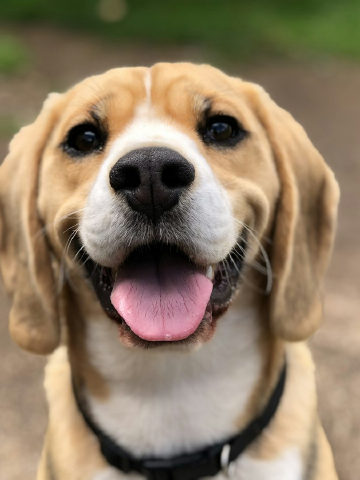
A clear, well-lit photo with one main subject and a plain background. Faces and pets should fill most of the frame. Strong light from one side gives the most interesting shapes.
Not if you fix them first. The tool marks every loose piece in red, and Fix all adds thin bridges so each piece stays attached to the rest of the pumpkin.
In the PDF settings, choose a custom width and enter the width of the flat side of your pumpkin. A stencil 6 to 8 inches (15 to 20 cm) wide fits most medium pumpkins.
Yes. The printable PDF and the PNG are free, in full resolution, with no watermark. You only pay if you want SVG or DXF files for a cutting machine.
No. Your photo is processed in your browser and never leaves your device. So a photo of your kids or pets stays private, even when it ends up on your porch.